So, this class is going to be rough.. lol 4 hours a week of notes, and trying to keep up. We are required to take notes in order to do well on the midterms and such. So I am going to be posting my notes for each week here to have them available to me at all times as well as hopefully helpful to someone else.
Anyway we started out with the newman character model, minus to rigging.
Our teacher started with showing us a Nurbs Curve Box. (The little box that goes around the feet and knees and contains all your attributes for animating.) Here are my notes for that..
Nurbs curve box
Create poly cube
Create > ep curve tool (options box)
Set degree to 1 linear
Hold down v and click on all verts
Press Enter
Use your move tool to pull it away from the original box
The Rigging started with the Reverse Leg setup as well as reverse foot. We hid the box on a layer and pulled our character into side view.
REVERSE LEG SETUP
Look at character in Side view
Animations tab
Skeleton > Joints
Start your joints at the hip area on your character and then click down in this order
Hip > Knee > Ankle > Ball > Toe
Make sure your view joints is on in view port
Name all joints (Hip, Knee, etc.)
To move a little hold D while moving joint
Click top joint
Modify > prefix hierarchy name > add left or right
REVERSE FOOT SETUP
Sideview > Joint tool > Add Heel > Hold V (snap) and click on toe > ball > ankle
Name them
Move into place
Snap them together
Skeleton > Orient Joint
(More to come very soon. Need to get a few things done at the moment)
-Anna
Showing posts with label Angela Meeks. Show all posts
Showing posts with label Angela Meeks. Show all posts
Thursday, January 15, 2009

Saturday, January 3, 2009
Modeling Shaggy from Scooby Doo
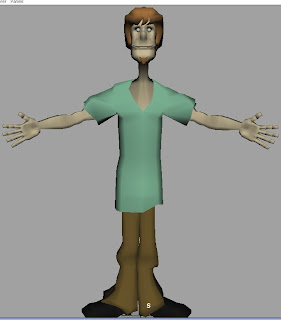
Back in October 2007 I finished a character model of Shaggy for a class assignment. I have decided to post a small tutorial for me to look back on as well as training to anyone who might need a little help. I will not get into actual modeling detail because I am not a great modeler myself but this is more on how I set up maya to model.
Okay to start the class we needed a character turnaround of Shaggy and there was conveniently one found on google image search. which I cant find anymore but I have my cut up version. I took it into photoshop, cut out the front and side view and resized them so they matched up perfectly.
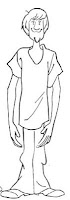
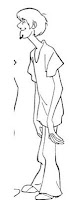
Then the next step is to import them into my front and side image planes. I named them front and side and droped them into my source images folder. I opened a new project in Maya and made sure it was set. Go to your 4 panel view (Persp/Side/Front/Top) and then open your front view. Inside the stage area open View from your menu bar, then go down to Image Plane > Import Image.
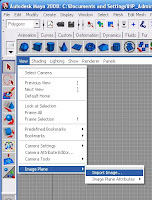
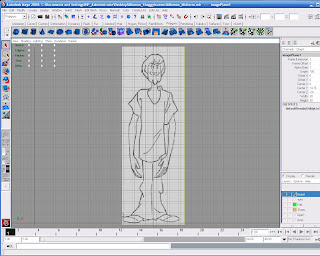
It should open your source images folder if you have your project set. Inside that select your front picture and open. You should now see your picture on the stage. You will want to line it up correctly so the feet touch the bottom line and the middle line cuts the body in half (or close to that). If you click off of the picture you can reselect by following the same menu choices ( View > Image Plane > Image Plane Attributes > ImagePlane1 ) You can move it around by clicking open your Channel box/layer editor while the picture is selected. Then you use your Center X, Y, and Z numbers to move it. Center Z should move it back ward away from your stage. You will want to keep track of what number you use for that in order to keep consistency with your side view.
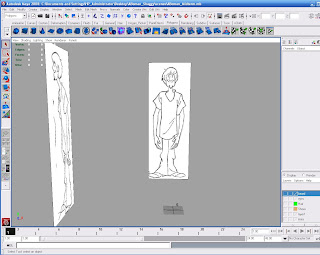
Now do the same thing with your side view. Import your image plane the same way. Then click your perspective view and you should see this.
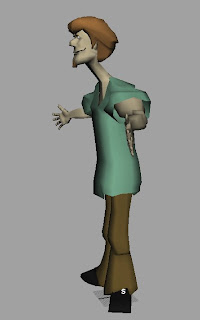
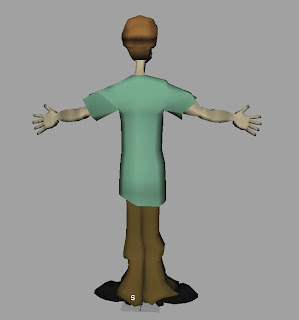
So now you can finally begin modeling. We started with a hand which took about 4 hours to complete, and then we were kind of let loose to play with vertices and polygons.. lol I found the hardest peices were the face and hair. I know I was trying to do this as sort of a tutorial but I am tired and so I may add more later. Here are a few pictures of my final model though. I got an A (95/100)
-Anna
Okay to start the class we needed a character turnaround of Shaggy and there was conveniently one found on google image search. which I cant find anymore but I have my cut up version. I took it into photoshop, cut out the front and side view and resized them so they matched up perfectly.


Then the next step is to import them into my front and side image planes. I named them front and side and droped them into my source images folder. I opened a new project in Maya and made sure it was set. Go to your 4 panel view (Persp/Side/Front/Top) and then open your front view. Inside the stage area open View from your menu bar, then go down to Image Plane > Import Image.

It should open your source images folder if you have your project set. Inside that select your front picture and open. You should now see your picture on the stage. You will want to line it up correctly so the feet touch the bottom line and the middle line cuts the body in half (or close to that). If you click off of the picture you can reselect by following the same menu choices ( View > Image Plane > Image Plane Attributes > ImagePlane1 ) You can move it around by clicking open your Channel box/layer editor while the picture is selected. Then you use your Center X, Y, and Z numbers to move it. Center Z should move it back ward away from your stage. You will want to keep track of what number you use for that in order to keep consistency with your side view.

Now do the same thing with your side view. Import your image plane the same way. Then click your perspective view and you should see this.

So now you can finally begin modeling. We started with a hand which took about 4 hours to complete, and then we were kind of let loose to play with vertices and polygons.. lol I found the hardest peices were the face and hair. I know I was trying to do this as sort of a tutorial but I am tired and so I may add more later. Here are a few pictures of my final model though. I got an A (95/100)


-Anna
Subscribe to:
Posts (Atom)